Step 1
New lead created
MAP
Solves for inbound demand that goes cold because the response is too slow or inconsistent to keep pace with volume.
The first touch email lands while interest is high, not days later after the moment has passed.
Each message is highly personalized and relevant, even when hundreds of leads arrive at once.
By taking manual follow-up off reps’ plates, your team can focus on work that moves the needle.
Outreach connects to the CRM and tools your team already uses, then layers on AI agents that do a rep's manual work for them. Here's the full path—from a brand-new MQL to a personalized first touch email.
Step 1
New lead created
Lead becomes an MQL
Lead added to a sequence
Research Agent extracts context
Personalization Agent crafts the message
First-touch email sends automatically
A new record is created from an inbound action—form fill, content download, event, or similar.
The prospect’s score hits your defined MQL threshold and is routed to your sales team.
The prospect is automatically enrolled into the right follow-up sequence within Outreach.
It pulls current priorities, strategic initiatives, hiring signals, and role insights from publicly available sources.
It weaves research, key details, and the inbound action together to write the first-touch email.
Personalized outreach goes out on behalf of the rep—timed, relevant, and on-brand.
In Outreach, an agent is set up once with plain-language instructions—no code. You tell it what to look for and what to produce. Here's exactly how the agents in this recipe are configured: one to gather context, one to turn it into a message.
.png)
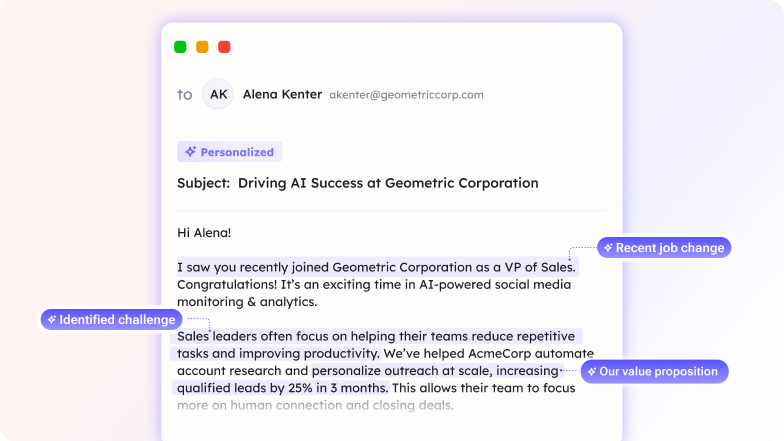
How quickly should I respond to inbound leads?
The sooner, the better. Research shows leads are 50x more likely to convert if contacted within 5 minutes. With this recipe, the Research Agent researches the lead while the Personalization Agent drafts the first email—all within seconds of the lead arriving.
What if I want to personalize the message even more?
You can customize the Personalization Agent's instructions to emphasize specific talking points, company details, or use cases. The agent will pull information from the prospect's company and role and weave it into the message automatically.
Does this recipe work for different lead sources (forms, chatbot, etc.)?
Yes. The recipe detects when a new qualified lead arrives from any source—web form, chatbot, webinar, demo request, etc.—and responds with the appropriate message. You can customize the trigger criteria to match your lead scoring.
Can I review emails before they're sent?
Yes. You can configure the recipe to either send automatically or send a draft to the rep for approval. Most teams start with approval mode, then move to auto-send after 50-100 emails prove the quality is consistent.
What happens if a lead is already in my CRM?
The recipe checks your CRM before responding—if the lead already exists, it won't send a duplicate email. It will either route to the assigned owner or add context to their existing record so they can follow up directly.
How much time does this save per lead?
Each lead saves 5-10 minutes of manual research + email writing. Across 20-30 inbound leads per week, that's 2-5 hours per rep per week—time they can spend on qualification calls instead.


Diagnose customer churn
See what drove the loss, what signals appeared early, and where future win-back opportunities may exist.

Engage the right buyers
Reach people who shape the decision with targeted messaging that speaks to their role and reality.
Prep for key meetings
Get the full account picture with recent activity and strategic deal context in one exec-ready summary.
