

Blog
How to roll out AI workflows with confidence: Predictable credit use by design
October 22, 2026
Read more
You’ve been asked to roll out a new AI workflow. The upside is easy to see: less manual research, faster follow-up, cleaner data. The worry is quieter, and it tends to show up right after the excitement. What if the agent uses credits on something that isn’t driving value? What if it’s running without the right guardrails?
If you’re the RevOps leader who owns the rollout, often the only one, those questions aren’t abstract. You’re the person who’ll be asked where the credits went.
Let’s be clear about the goal. It isn’t to use fewer credits. Credits are what power your AI workflows, and a team that uses more of them on the right work is usually a team that’s getting results. The goal is to make sure each credit goes toward something worth doing.
That’s where the worry comes from, and it comes in two forms:
The right agentic platform addresses both, and neither means slowing down. Here are five steps to take to ensure you’re getting the most value about of AI credits.
The way we see it is simple: every agent should have a defined action within a defined workflow. When you can say “this agent does this, in this workflow, for this team,” you know exactly what’s driving value, and you know where to look if something changes.
Outreach gives you controls to set that up. The AI Control Hub lists each AI feature and its status in one view, so you can enable or disable features individually. Open a feature and you can see which models it uses and how it’s charged. Deal Agent, for example, is usage based, charged per use. Profile assignment then lets you decide which teams get access, from SDRs to AEs to to CSMs, or all of your teams.
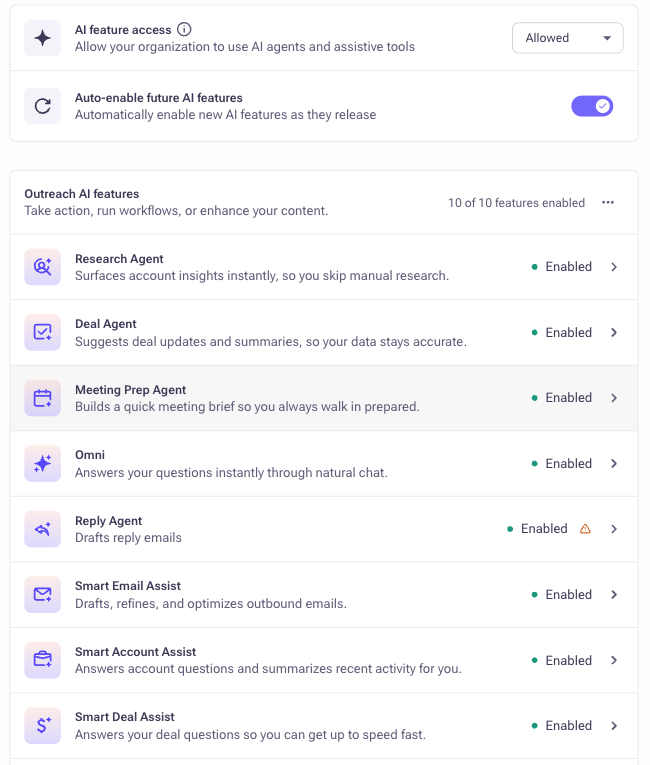
Outreach Features page listing AI agents and assistants with their status and an auto-enable setting for new features
Put together, that’s what we mean by predictability by design. You decide what’s on, for whom, and what it’s for before anything runs.
Start with the revenue workflow you want to automate. Then, before you turn anything on, work out what it’s likely to consume. Which agent or agents will handle it? What action will they take? How often will that happen, and across how many people?
Keep the first use case specific. You might start with Research Agent for one SDR team, or Deal Agent for a single group of AEs. A narrow scope makes your estimate easier to build and easier to check.
Your estimate doesn’t need to be perfect. It just needs to give you something to compare against.
Walk through how to manage AI features, assign access by team, and track credit usage in Outreach. It takes just a few clicks.
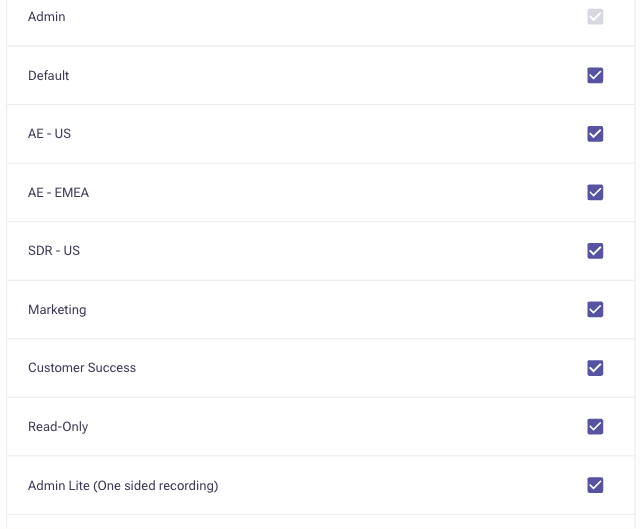
Resist the urge to launch for everyone at once. Pick one use case or one team, and use profile assignment to limit access to that group. Let it run for a while. Then compare actual usage to your estimate.
If the two are close, you have a model you can repeat. If they aren’t, you’ve learned something early, when it’s easy to adjust, instead of after the rollout is everywhere.
Rollout isn’t a one-time event, so keep an eye on how things are going. The AI Metering Dashboard shows your credit summary with remaining and used credits, plus three views that help you dig in:

A monthly check-in is usually enough to notice what’s driving value, catch anything unexpected, and plan your next rollout.
Once usage matches what you expected, expand to more teams and more workflows. As adoption grows, you may need more credits, and that’s a good sign. When you’re ready to expand usage or add more agentic workflows, requesting more credits is a click away from the same page where you track consumption.
Scaling is where the value tends to show up. SailPoint, an enterprise identity security company, had aggressive growth targets and no additional headcount to meet them. Its sales leaders invested in Outreach agents and Kaia to cut manual research and make selling more consistent across reps. They’ve since rolled the motion out in seven languages and report open rates more than 50% higher with agentic AI. A rollout like that is a good example of why it pays to start with a clear picture of what each agent is doing.
Before you switch on your next AI workflow, make sure you can answer these:
Governance isn’t there to hold AI back. It’s what lets you say yes to the next workflow without wondering where the credits are going. When every agent has a defined job, you’ve estimated before launch, and you can see usage as it happens, you’re free to focus on the part that matters: putting AI to work where it moves revenue.
Outreach Agents follow a usage-based pricing model. Total costs depend on your usage model and which agents you deploy. For example, if your team of 10 AEs uses Deal Agent 5 times per week, you're looking at roughly 200 uses monthly. Research Agent and other workflow automation agents follow similar usage-based pricing.
The best approach is to estimate your use case upfront (which our guide covers in Step 2: "Estimate before you launch") and then pilot with one team to compare actual usage to your projection. Most teams find their estimate is close, and they can confidently scale from there.
With Outreach's AI credit model, you stay in control. You decide upfront how many credits to budget for overall. Then, with the AI Control Hub, you decide what agents are enabled and who has access. The AI Metering dashboard gives you real-time visibility into credit usage—you can see consumption over time, spot trends early, and adjust before you hit any limit. If you're approaching your budget and want to scale further, requesting more credits is just a click away from the same dashboard where you track usage.
Absolutely—and we recommend it. In fact, our research shows the most successful rollouts start small: pick one team (like your SDR or AE team) and one use case (like account research or opportunity field updates), then pilot for a few weeks.
Why? Because small pilots let you test your estimate against real usage, catch any workflow issues early, and build internal confidence in the AI before expanding. Profile assignment in Outreach makes this simple—you can grant access to specific teams and gradually expand as adoption grows. Starting small isn't a constraint; it's the fastest path to confident scaling.
Define success metrics upfront. In your pre-launch checklist, ask: "How will we know it's working?" Common metrics include deal velocity (% faster), response rates (% higher), ramp time for new reps, and data quality improvements.
Then use the AI Metering Dashboard to track adoption (credit usage by user, usage distribution by action) and cross-reference that with your sales metrics. A monthly check-in is usually enough to spot trends. The SailPoint case study in our guide is a good example: they tracked open rates and saw a 50% lift with agentic AI deployment.
Draft Answer: Yes. Outreach integrates natively with Salesforce, Microsoft Dynamics, and 85+ other tools. AI agents sit on top of those integrations, so they work seamlessly with your existing CRM and revenue operations stack.
When you deploy agents like Deal Agent or Research Agent, they pull data from your CRM, enrich it, and push updates back—all without requiring new tools or manual data entry. This is one reason the platform consolidation approach works: instead of juggling separate point solutions, your agents operate across your unified revenue data.
How to roll out AI workflows with confidence: Predictable credit use by design
October 22, 2026

Building the business case for AI sales tools in revenue
October 21, 2026

How to build frontline trust in AI agents (and why coaching beats prospecting as the starting point)
October 21, 2026
