

Blog
Sales call coaching that sticks: How Outreach and Yoodli help reps put feedback into practice
November 18, 2026
Read more

TL;DR: Outreach Skills is a single install that gives ChatGPT a secure connection to Outreach, over 20 ready-made revenue workflows, and on-screen views of the results. Sellers, managers, and CSMs go from question to action without switching tools, which means more time selling and more confidence in every deal. Admins keep the roles, permissions, and approvals they already have.
Your team probably already uses an AI assistant for drafting, research, and analysis. But when the work involves a deal, an account, or a forecast, someone still copies Outreach details in and copies the answer back. That manual work adds up, and it pulls attention away from the customer conversations that move deals forward.
Outreach Skills closes that gap. It brings live Outreach data and over 20 ready-made revenue workflows into your AI assistant in a single install, so sellers, managers, and CSMs can go from question to action without leaving the assistant they already work in. Ask for a meeting brief, a pipeline review, or an at-risk account report, and the assistant answers from your own Outreach accounts, tasks, sequences, and calls, then shows the results on screen.
It builds on the Outreach app in ChatGPT we launched in June, which gave teams a direct connection to their Outreach data. Outreach Skills adds the playbooks and views on top and packages it all together.
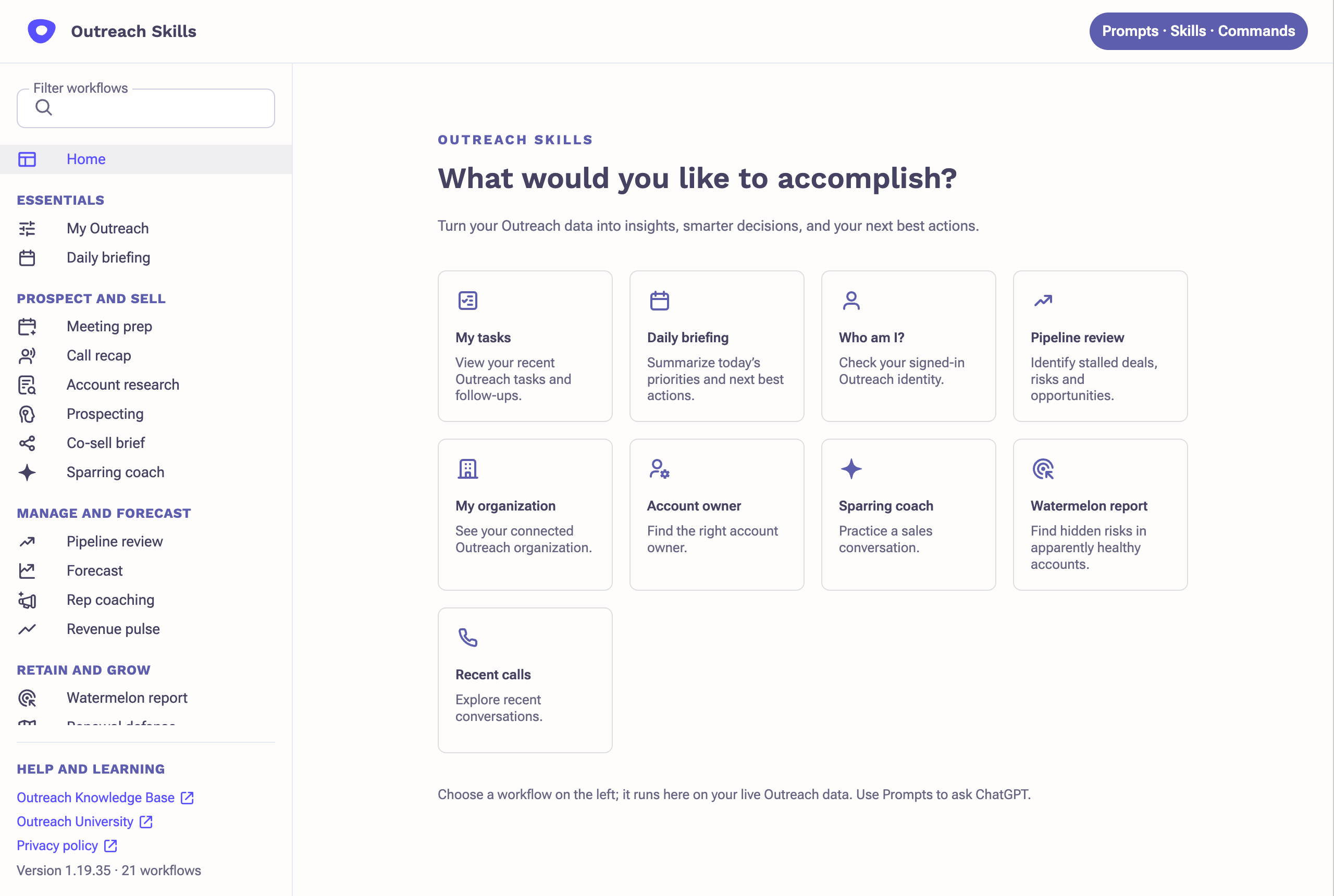
Outreach Skills is a Plugin Extension that connects ChatGPT to live Outreach data and provides over 20 ready-made revenue workflows for sellers, managers, CSMs, revenue leaders, and RevOps teams.
Revenue teams are doing more of their everyday work in AI assistants. Outreach Skills brings Outreach into that workflow, packaging proven revenue workflows as skills inside ChatGPT. With Outreach Skills, teams can:
Because the live Outreach connection is part of the package, answers draw on your accounts, prospects, tasks, sequences, and calls rather than on whatever someone pastes in.
Each workflow view lists the Outreach records it used, so users can review the source information behind the results. That’s where the confidence comes from: every answer points back to the records behind it. Here are four to start with, one for each stage of the revenue cycle.
A seller asks, “Build a list for [account].” Outreach Skills returns a prospect list, a reason to reach out to each person, and a first-touch draft for each. Nothing is enrolled yet. Before it adds anyone to a sequence, it confirms the exact details and waits for your approval. That’s the move from question to action, with you deciding when the action happens.
The other workflows in the table work the same way. Watermelon report, for example, helps CSMs catch risk that isn’t obvious. An account can look healthy while renewal risk builds underneath, so it checks for signals such as a quiet champion, leadership changes, and budget or competitor mentions in recorded calls. It then combines those findings with input from the CSM to prioritize accounts for follow-up. Call-based signals require Kaia.
These are four in a catalog of over 20. The rest cover forecasting, rep coaching, renewal defense, executive business reviews, and more. Every rep, manager, and CSM runs the same workflows with the same defined steps, and each one suggests a sensible next step.
Admins enable one plugin, in a single step. It includes:
Outreach Skills doesn’t change existing Outreach workflows, screens, roles, or permissions, and there’s nothing to migrate.
Each person signs in with their own Outreach login, so the assistant sees only what that person can already see. Before it changes anything, it confirms the exact details, and nothing changes without the user’s approval. It never deletes records as part of a workflow, and the views are look-only.
Setup is minimal. On the first run, the Start here skill builds itself from your Outreach data. Users confirm company, offering, buyers, and voice. There are no setup forms and no prompts to write.
For RevOps, three skills are built for the admin work that often waits for a free afternoon:
Outreach Skills is meant to feel like part of the assistant your team already uses, so setup is short. Your admin turns it on once, and everyone else can start asking for work in plain language.
You’ll need a ChatGPT plan that supports plugins (Business, Enterprise, Healthcare, or Edu), and usage consumes Outreach Amplify credits.
Outreach Skills is a single install that brings a secure connection to Outreach, 20+ ready-made revenue workflows, and on-screen views into your AI assistant. Sellers, managers, CSMs, leaders, and RevOps teams can ask for the work in plain language and get answers grounded in their own Outreach data.
No. Your existing Outreach workflows, screens, roles, and permissions stay the same, and there’s nothing to migrate. Each person signs in with their own Outreach login, so the assistant sees only what that person can already see.
No. It confirms the exact details before any change and never deletes records as part of a workflow. The on-screen views are look-only.
Workspace admins. They control which plugins members can install in ChatGPT.
A ChatGPT plan that supports plugins (Business, Enterprise, Healthcare, or Edu), and usage consumes Outreach Amplify credits.
Sales call coaching that sticks: How Outreach and Yoodli help reps put feedback into practice
November 18, 2026

Before you add more AI: 6 lessons on building the right foundation
November 17, 2026
From question to action: Outreach Skills brings over 20 revenue workflows into ChatGPT
November 17, 2026
