Blog
AI Agent Interoperability: How Connected Agents Align Sales and Marketing
October 22, 2026
Read more
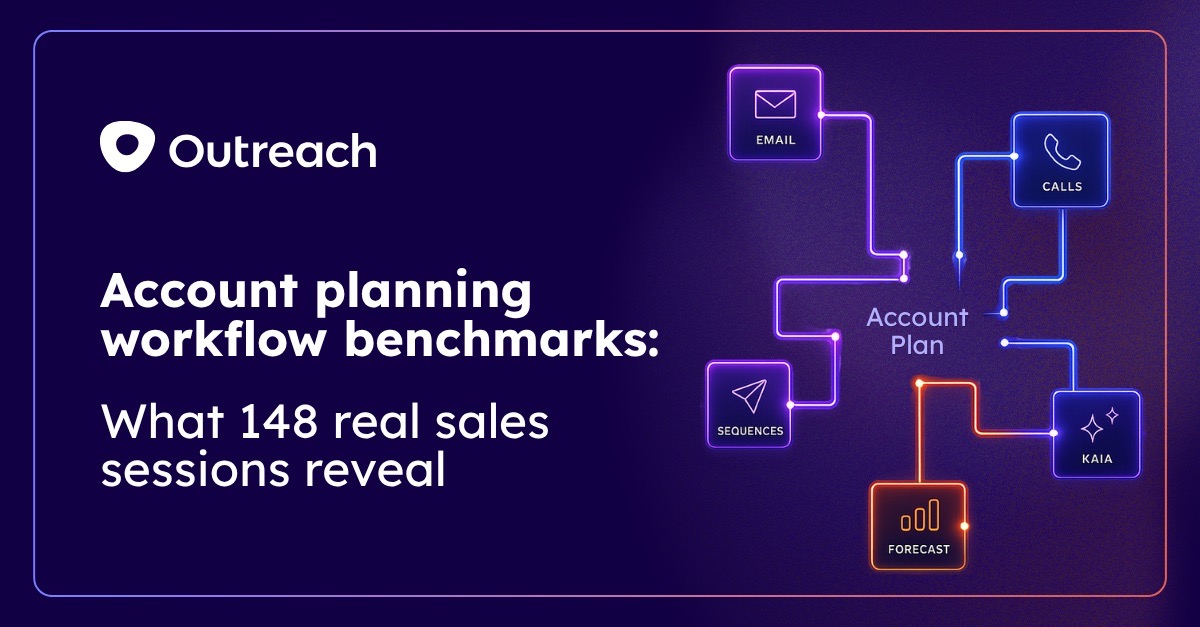
There's a version of account planning that sales leaders know well. Reps fill out a template before a QBR, check a box, and move on. The plan lives in the CRM, rarely updated, rarely revisited, quietly gathering dust between deals.
And then there's a version that tells a different story, based on what we actually observed with real data.
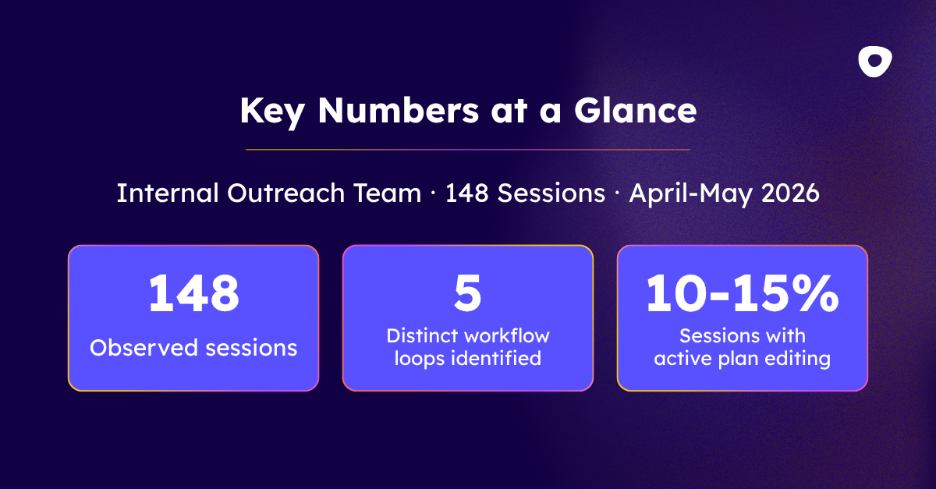
Over two months (April and May 2026) the Outreach Insights Group analyzed 148 sessions of our own internal reps using Account Plans inside Outreach. What we found wasn't a documentation exercise. It was something closer to a daily operating rhythm. Reps weren't visiting account plans once a week to update a field. They were returning to them three to four times a day to inform them of their next action.
The account plan was a place where work got started, not just recorded. This report shares what we saw, loop by loop and section by section, including how account plan usage connects directly to quota attainment. If you've ever wondered whether account planning actually moves the needle on revenue, we've got a pretty clear answer.
A quick note on methodology before we get into it. The Outreach Insights Group turns anonymized platform data into benchmarks and research that help revenue leaders understand how work gets done, where AI delivers measurable impact, and what top-performing teams do differently.
The behavioral findings in this report come from observed session data across approximately 148 internal Outreach sessions between April 1 and May 31, 2026.
The quota attainment findings come from an analysis of New Logo (NL) Account Executives, looking at the relationship between account plan usage frequency and quota performance over the same period. All findings are from Outreach's own revenue team and should not be read as cross-customer benchmarks nor a guarantee of exact results at your organization.
Without exception, every session we observed followed the same sequence: reps read before they act.
Reps didn't open an account plan and immediately started firing off emails. Every single session began with information gathering, like scanning deal health, checking the activity feed, reviewing a Kaia recording, reading through the engagement strategy. After these steps they moved to action.
While this may sound obvious, there’s a real implication: account plans are the preparation ritual that precedes execution.
In 148 sessions, not a single rep started their session by navigating directly to an account plan as a destination. Every session arrived from somewhere else. Let’s break down the five confirmed entry points:
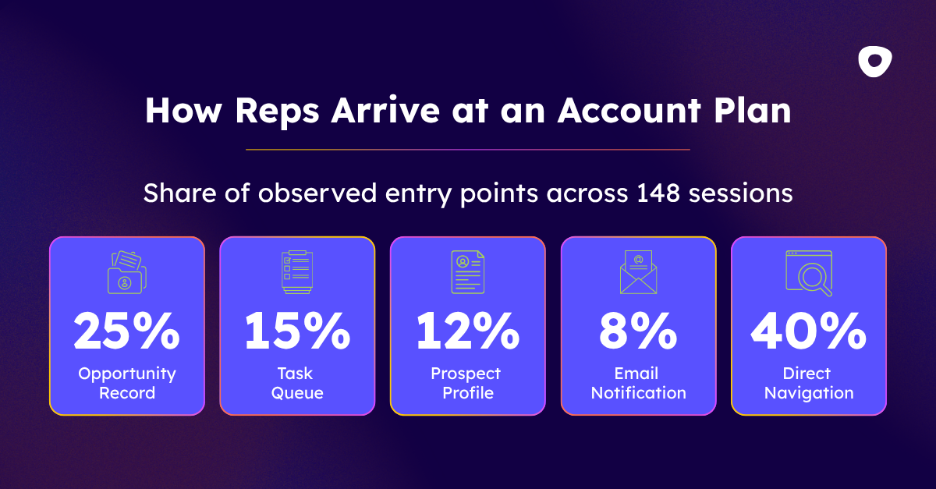
What this tells you is that account plans aren't a separate tab in the workflow. They're woven into it. Reps arrive from wherever they're already working, like in their deals, tasks, contacts, their inbox.
When they arrive in the account plan, the plan acts as the connective layer that pulls everything together before they take action.
Each path into an account plan signals a different mindset. Reps arriving from a task queue are in execution mode. Reps arriving from an opportunity record are in deal review mode. The entry point is a proxy for the job the rep is trying to get done.
Not all sections of an account plan get equal attention. Across 13 sections, the top two — Opportunities/Deal Health and Activity Feed — were the most engaged by a wide margin. 92% of sessions were in the Opportunities/Deal Health section and 78% of sessions in Activity Feed.
Here's the full breakdown, ranked by how frequently each session was visited by reps:
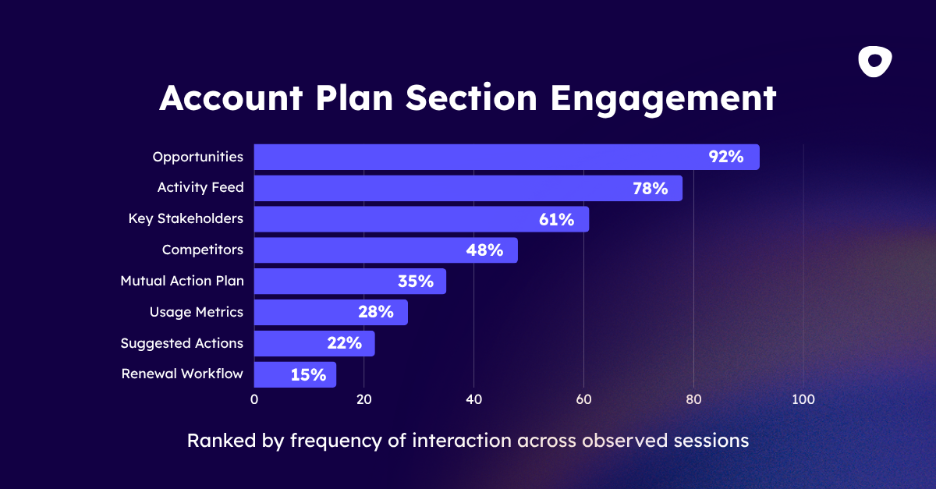
AEs drop off the universal sections and head straight to Key Stakeholders and Competitors. They're building context around the buying committee and keeping tabs on the competitive landscape, two things that most directly affect whether a deal closes.
CSMs skip past the competitive and stakeholder sections entirely and gravitate toward Usage Metrics and the Renewal workflow. Their job isn’t about winning deals, but rather keeping them afloat.
Managers use the plan primarily for forecast validation. They're not going deep on individual accounts the way AEs and CSMs are. They're using the plan as a check against the numbers, in order to make sure what's in the forecast actually reflects what's happening on the ground.
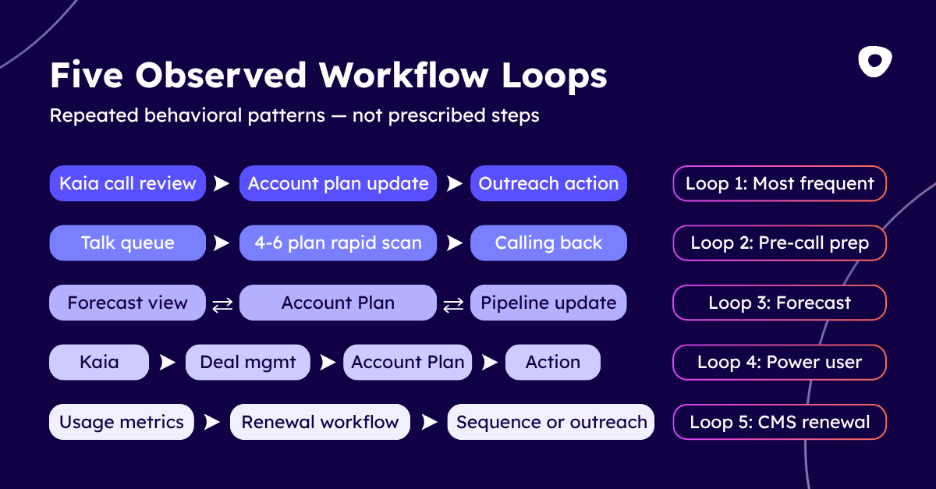
Across 148 sessions, we observed five distinct workflow patterns. These are the five most commons ways reps moved within Account Plans:
This was the single most distinctive pattern across all sessions. Reps review a Kaia meeting recording. They navigate to the Account Plan to cross-reference what was discussed against the current strategy. Then they act, with most likely an email. The complete loop — Kaia review, Account Plan, email sent — was captured multiple times within a single session. It wasn't a one-off but rather a repeating pattern across different reps and different accounts.
What makes this loop significant is what it represents for AI adoption. This isn't a rep who uses Kaia sometimes and account plans sometimes and occasionally they overlap. This is a rep who has built a consistent, connected workflow where conversation intelligence flows directly into account strategy and immediately triggers outreach.
AEs visit 4–6 account plans in rapid succession before a calling block, spending 2–5 minutes on each. That's potentially up to 30 minutes of focused account context consumed before a single call is made. They scan the Activity feed, Contacts, and Social Overview. At this time, they're orienting themselves before every conversation, gearing up to make an impact.
By the time a rep picks up the phone, they're already current on deal health, recent activity, and stakeholder context — pulled from a live system, not yesterday’s news.
This one runs in both directions. Reps update forecast fields and then drill into the account plan to validate the context behind the numbers. Managers review account plans and then check the forecast rollup to see how individual account health translates to pipeline. We confirmed this pattern at every level of the org — rep, manager, and leadership — making it the most cross-functional of the five loops. The account plan and the forecast are like a check-and-balance system, each one informing the other in real time.
This was the most sophisticated workflow we observed:
Forecast rollup → filter opportunities → open Kaia recording → extract action items → return to forecast → inline edit opportunity fields.
Six steps. Three major product areas — forecasting, conversation intelligence, and account management — navigated within a single session, with each step informing the next. It's not the most common pattern, but it's the clearest picture of what high-ceiling usage looks like. Reps who operate in this loop aren't using Outreach as a CRM with extra features. They're using it as an integrated intelligence system.
CSMs follow a defined path that's specific to their motion: Renewal Kick-Off meeting review in Kaia → Opportunities filtered to "Renewals next quarter" → Account page for upcoming agenda.
Account Plans are the connective hub of the entire renewal workflow. They're where CSMs ground themselves in the conversation history, validate deal status, and prepare for what comes next.
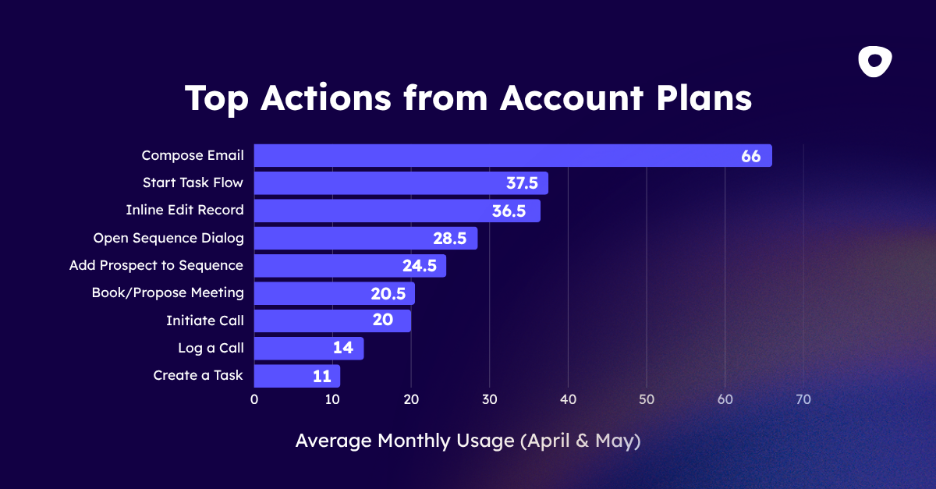
Across both months, reps took a combined 517 downstream actions immediately after account plan sessions. That’s an average of roughly 8–9 distinct execution steps per day triggered directly from the plan.
Email is the runaway leader. At 67 instances in April and 65 in May, composing an email was the #1 action out of account plans, which accounted for roughly 25% of all downstream actions and outpaced the next closest behavior by nearly 2:1. That aligns directly with Loop 1: reps are reading, synthesizing, and then writing. The plan informs the message.
The consistency across April and May matters too. The numbers barely moved month over month: task flows went from 39 to 36, inline edits from 38 to 35, sequence dialogs from 31 to 26. These aren't one-time behaviors or outliers from a single sprint. They're stable, habitual patterns.
And the range of 9 distinct action types (from email and sequences to calls, meetings, task flows, and inline edits) confirms that account plans are triggering the full spectrum of sales execution, not just one type of follow-up.
In about 10–15% of sessions, reps didn't just read, but they also updated. The fields most commonly edited were Business Case and Key Stakeholders (during active deal stages), the Next Steps field (updated immediately after review), and opportunity stages. Bulk sequence enrollment also showed up here. For active deals, an account plan is like a working sound board.
The behavioral data above shows how reps use account plans. But the question on every sales leaders mind is: does it actually affect performance?
We looked at New Logo Account Executive quota attainment and bucketed reps by how many account plan events they logged per month — interactions that included clicking into account page tasks and opportunities, reviewing Kaia items and activity timelines, managing prospect relationships and org chart data, customizing Smart Account Plan layouts, and reading Research Agent tiles.
Here's what we found across three usage tiers:
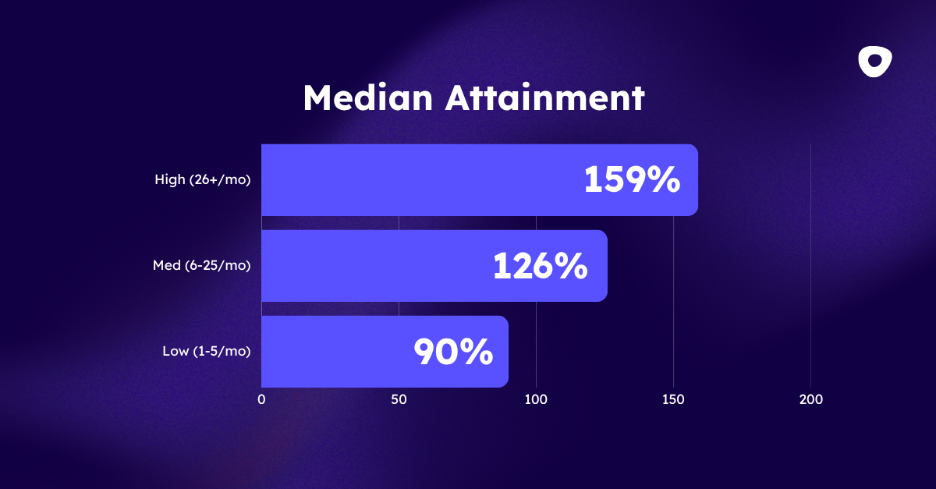
Reps in the high-usage tier (26+ account plan events per month) hit nearly double the quota attainment of low-usage reps. Moving from low to medium usage alone is associated with a 36-point jump in attainment. The relationship is linear across all three tiers: more engagement, better results, at every level.
To be clear about what this is and isn't: this is a correlation, not a controlled experiment. Reps who are more engaged overall likely use account plans more and hit higher numbers — the causality runs in both directions. The sample sizes here are directional rather than statistically definitive, and findings reflect our internal team, not a cross-industry benchmark.
But we can't ignore that the pattern is clean, consistent, and linear. Among the reps we analyzed, higher account plan engagement is associated with meaningfully better performance at every tier. The more a rep builds and uses their account plans, the stronger their results the following quarter.
This framing essential: this is not adoption theater. Adoption theater is what happens when a team technically uses a feature, like maybe they open it, click around, maybe run a report, but the feature doesn't actually change how they work. The behavior looks like adoption from the outside, but it's not integrated into anything meaningful.
What we observed across 5 distinct AI features was the opposite. Power users have woven AI into every loop.
Key Insights panel — reps are using it as a synthesis layer after reviewing 6+ tabs. Instead of mentally piecing together deal health, activity history, engagement strategy, and stakeholder context, they let AI consolidate it. It's functioning as the "so what" at the end of the review.
Suggested Actions widget — AI recommendations are being read and acted on. Not dismissed, not ignored — followed. This widget appeared in the engagement data across both AEs and CSMs.
Suggested Updates — AI-driven prompts to update opportunity fields are being reviewed inline, with reps actively choosing to accept or dismiss them. They're treating these prompts as useful signals, not noise.
AI email composer (from Kaia) — emails are being drafted with AI assistance triggered directly from a Kaia recording. No switching tabs, no copying and pasting call notes into a separate tool. The insight and the outreach are happening in the same motion — which is exactly what Loop 1 looks like in practice.
Kaia transcript to Snippet — call insights are being codified into reusable sales snippets for future outreach. Reps are building institutional knowledge from their own conversations, at scale.
The through-line across all five: reps aren't using AI as a shortcut. They're using it as an intelligence layer that makes the rest of the workflow sharper. Given that high-usage reps hit 159% attainment versus 90% for low-usage reps, that intelligence layer appears to be doing real work.
Account Plans are a single product, but they're doing three different jobs depending on who's using them. The data makes that split clear across both which sections each persona reads and which workflow behaviors they run.
The first five sections (deal health, activity, engagement strategy, strategic initiatives, and Kaia recordings) are universal. Every role engages with them. After that, the plan diverges sharply.
AEs head straight to Key Stakeholders and Competitors after the universal sections. They're building context around the buying committee and tracking the competitive landscape, the two things that most directly affect whether a deal closes. Beyond section reading, AEs are primarily using account plans for deal execution: pre-call prep (visiting 4–6 plans before a calling block), the Kaia-to-action loop, Business Case and Key Stakeholders editing, and Mutual Action Plan review.
CSMs skip past the competitive and stakeholder sections entirely and gravitate toward Usage Metrics and the Renewal workflow. Their job isn't to win a deal — it's to keep one. The sections they read reflect that, and so do their workflows: Usage Metrics monitoring, the renewal motion (Kaia → Opps → Agenda), and Kaia-to-plan-to-action for customer conversations are their primary patterns.
Managers use the plan primarily for forecast validation. They're not going deep on individual accounts the way AEs and CSMs are. They're using the plan as a check against the numbers, making sure what's in the forecast reflects what's actually happening on the ground. Portfolio list view monitoring and Forecast → Account Plan validation are where they spend their time.
Here's the full behavior breakdown at a glance:
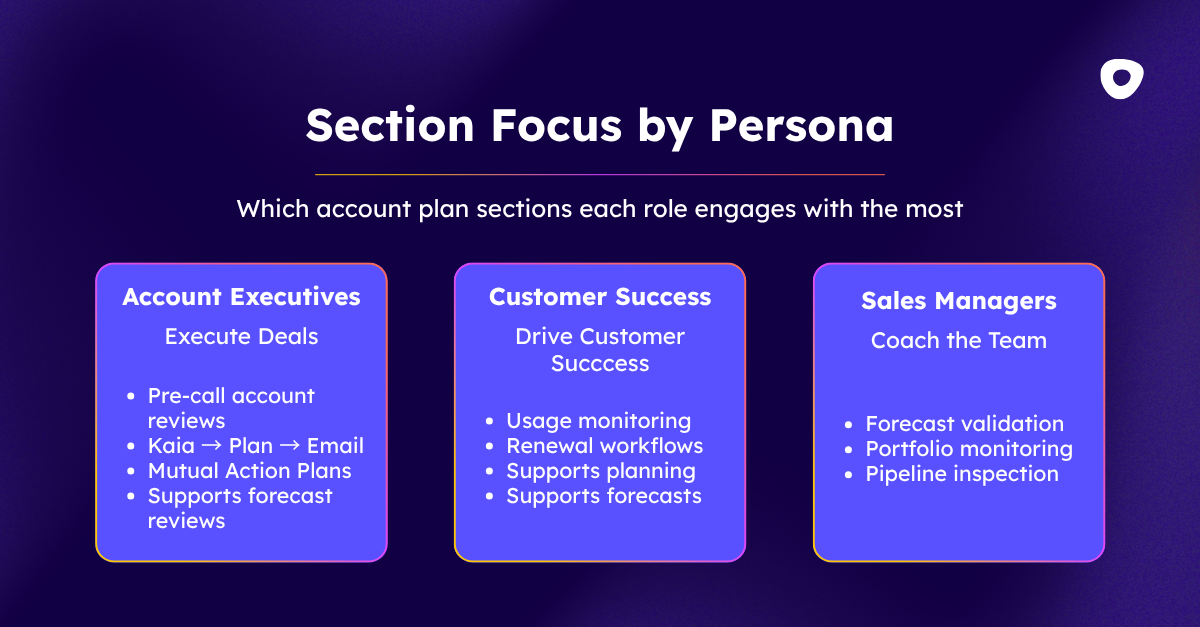
That persona split also points to something bigger: enterprise deals are a team game, not a solo sport. The account plan is the shared surface where AEs, CSMs, and managers stay aligned together. When everyone working an account operates from the same plan, the whole motion gets sharper: fewer gaps in stakeholder coverage, better handoffs between roles, and a buying committee that experiences a coordinated team rather than a scattered one.
The data backs it up — deals with multiple sellers assigned close 51 days faster and see a 2-point lift in win rate. If you want to go deeper on how leading teams are building that motion, the Team Selling Playbook is a good next read.
Reps who interact with account plans 26 or more times per month hit 159% quota attainment. Reps who interact 1–5 times hit 90%. That's a 76 percentage point gap, and it's linear. Every tier up is meaningfully better than the one below it.
The reps at the top of that range aren't doing anything ground-breaking. They're visiting plans 3–4 times per day, spending 5–20 minutes each time, running through the same 5 workflow loops consistently, and letting account context drive every email, call, and sequence they send. The plan is their operating rhythm, not their quarterly deliverable. Account plans work when they're embedded in the daily workflow, not filed away between QBRs.
A few things worth asking about your own team:
The data suggests the answers to those questions have a real, measurable impact on quota performance.
A sales account plan typically includes opportunity and deal health status, key stakeholder mapping, recent activity history, competitive context, and next steps or mutual action plan items. Based on observed session data, the sections reps engage with most are deal health, activity feed, and stakeholder data — suggesting those are the highest-priority fields to keep current.
AEs tend to focus on key stakeholders, competitive intelligence, and deal progression when reviewing account plans. CSMs gravitate toward usage metrics, renewal workflows, and customer health data. Managers use the same plan primarily for forecast validation. The same account plan functions as three different tools depending on the role accessing it.
Session data suggests account plans are most commonly updated at active deal milestones — after a call, before a forecast review, or when a stakeholder changes. The 10–15% active editing rate observed across sessions indicates that most account plan visits are read-and-act, not edit; updates tend to be concentrated among reps in mid-to-late deal stages.
Account planning covers the full customer relationship — stakeholders, history, goals, and health — across the entire account lifecycle. Deal management focuses on an active opportunity: stage progression, risk scoring, and next best actions. In a unified platform, account plans and deal data connect directly, so reps can move from account context to deal action without switching tools.